Self-billing: what is it and how do you receive your self-billing invoice via Peppol?
In short
- What is it? Every month, Wattify draws up the invoice for your charging income in your name. This is called self-billing or self-invoicing. You no longer need to send Wattify an invoice yourself.
- How does it work? You receive the invoice via Peppol in your accounting software, and we transfer the amount to your account as always. If something is wrong, let us know within 14 days.
- What do you need to do? Make sure your accounting software can receive self-billing invoices via Peppol. For that, the self-billing document types must be switched on. Not sure whether they are? Ask your accountant or the supplier of your accounting software.
- Where do you find them? On the platform under Payouts, with a number that starts with SB.
What is self-billing?
Drivers pay Wattify for charging at your charge point, and Wattify pays you your share of that income. For VAT purposes, you are the supplier and Wattify is the customer. Strictly speaking, you would therefore have to send Wattify an invoice every month.
With self-billing, Wattify does that on your behalf. We draw up the invoice in your name and for your account, based on the charging sessions we pay out. That is why the invoice carries the statement "Factuur uitgereikt door afnemer" (invoice issued by the customer). Belgian VAT legislation allows this if both parties agree and if you can review and accept every invoice.
Since 1 January 2026, invoices between Belgian businesses must be sent electronically via Peppol. This also applies to a self-billing invoice. It replaces the refund note you used to receive. The amount you receive does not change.
Who does it apply to?
- To owners of a charge site with a valid Belgian VAT number who receive a payout from Wattify.
- Don't have a VAT number, for example because you are a private individual? Then nothing changes: you receive your payout as before, with a refund note.
- Check that your name, address, VAT number and Iban are correct in your Customer data. We use them to draw up the invoice, and that is the account we transfer the amount to.
How does it work?
- At the start of every month, we calculate your payout, as always.
- We draw up the self-billing invoice. It gets its own number starting with SB, for example SB 2026000123.
- We send the invoice via Peppol to your accounting software. If your Peppol address cannot receive self-billing invoices, or you are not on Peppol, we send the PDF and the UBL file by e-mail to your Billing email.
- Review the invoice. If something is wrong, let us know within 14 days via Support or by replying to our e-mail. If we hear nothing, the invoice is considered accepted.
- We transfer the amount to your account, with the invoice's payment reference. When that happens is explained in When will I receive my payout?
- You book the invoice as a sales invoice. Wattify books it as a purchase invoice.
What do you need to set up?
On Peppol, your accounting software announces which kinds of documents it can receive. These are called document types. For ordinary invoices, that is Peppol BIS Billing UBL Invoice V3. A self-billing invoice is a different document type. You only receive it if these two document types are switched on as well:
- Peppol BIS Self-Billing UBL Invoice V3
- Peppol BIS Self-Billing UBL Credit Note V3
Many accounting programs only switch on the ordinary invoice types by default. Ask your accountant or the supplier of your accounting software to activate the self-billing document types. As long as they are not switched on, you receive the invoice by e-mail and import the UBL file into your accounting software yourself.
How to check it yourself
- Go to directory.peppol.eu.
- Search for your company number, without dots or spaces (for example 0123456789).
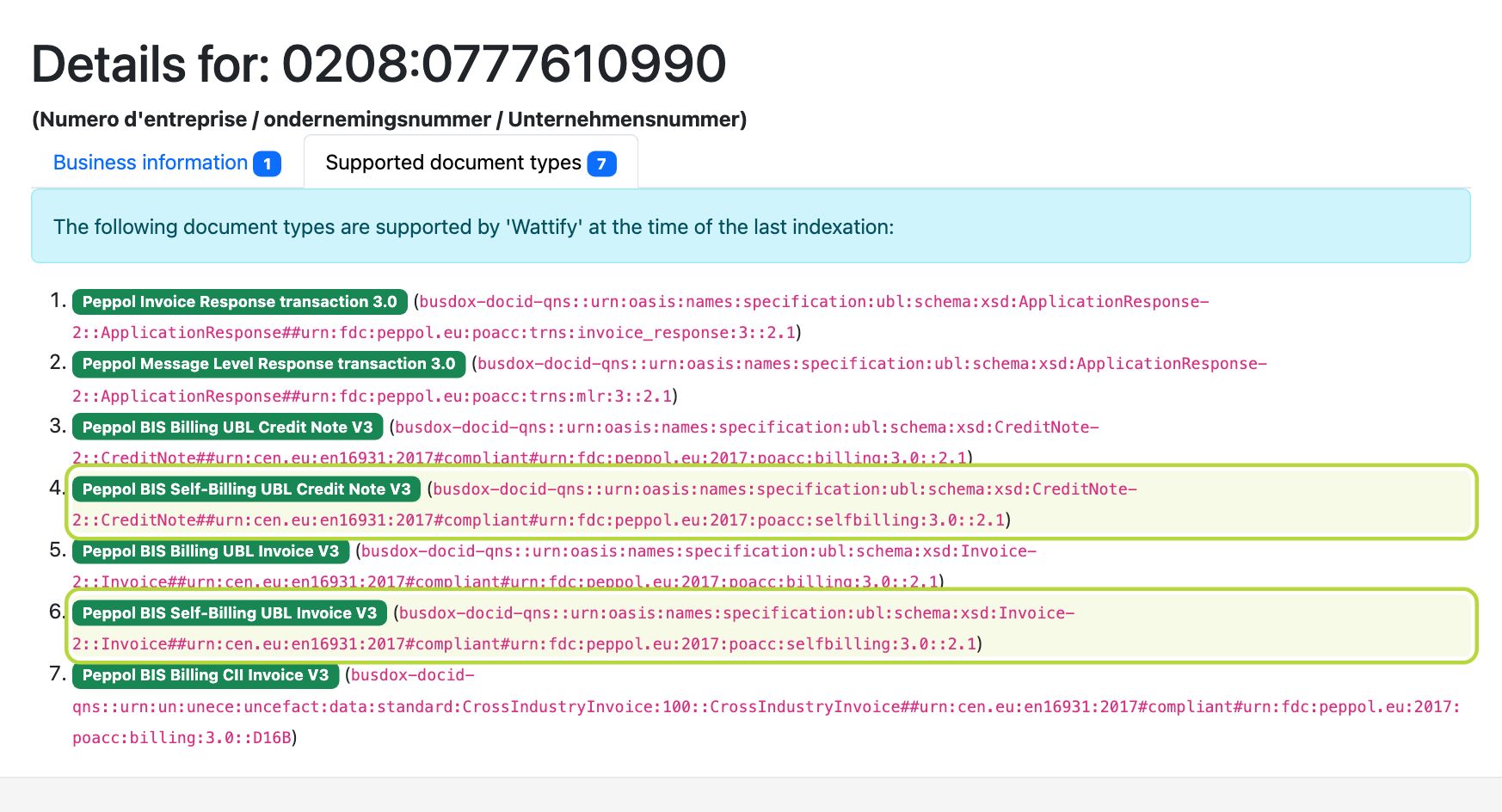
- Next to your company, click Show details and open the Supported document types tab.
- If Peppol BIS Self-Billing UBL Invoice V3 and Peppol BIS Self-Billing UBL Credit Note V3 are in the list, everything is in order. If you only see the types with Billing without "Self-", they still need to be activated.
This is what it looks like for Wattify itself: the two self-billing document types are in the list.
Where do you find your self-billing invoices on the platform?
In the menu, go to Payouts. You recognise a self-billing invoice by its number starting with SB. An ordinary refund note only has digits.
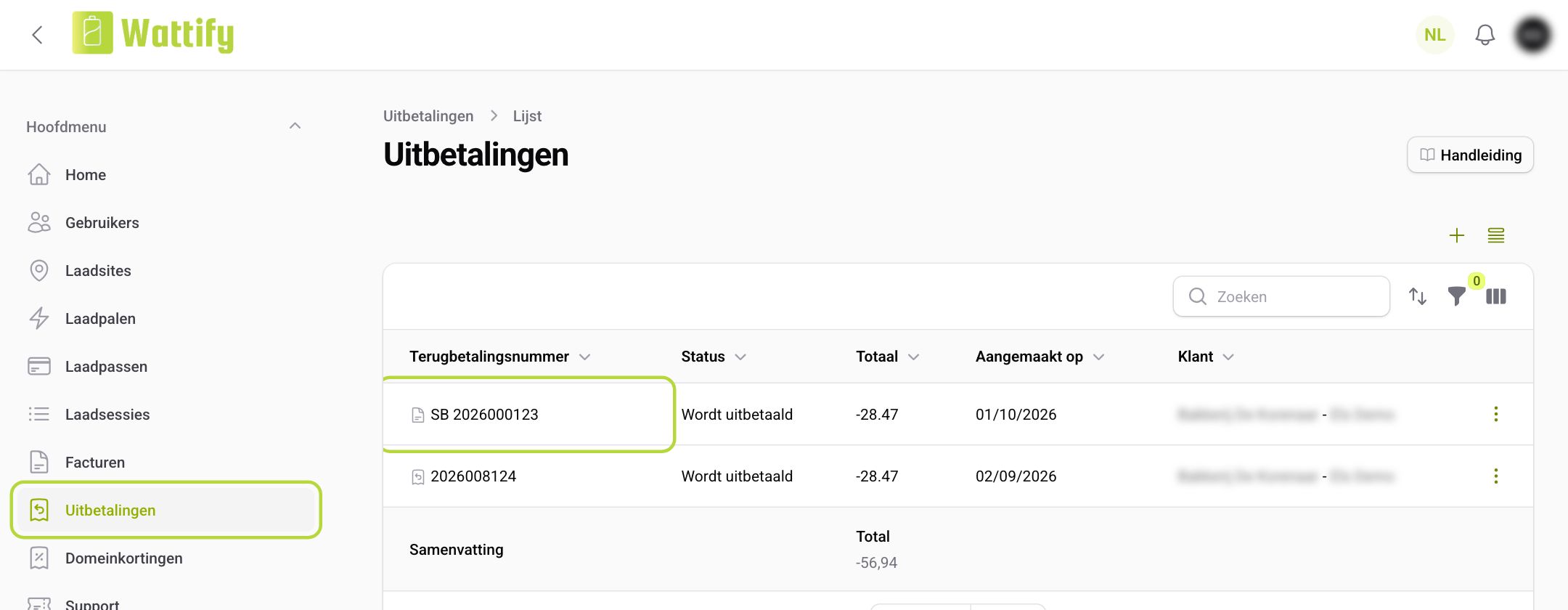
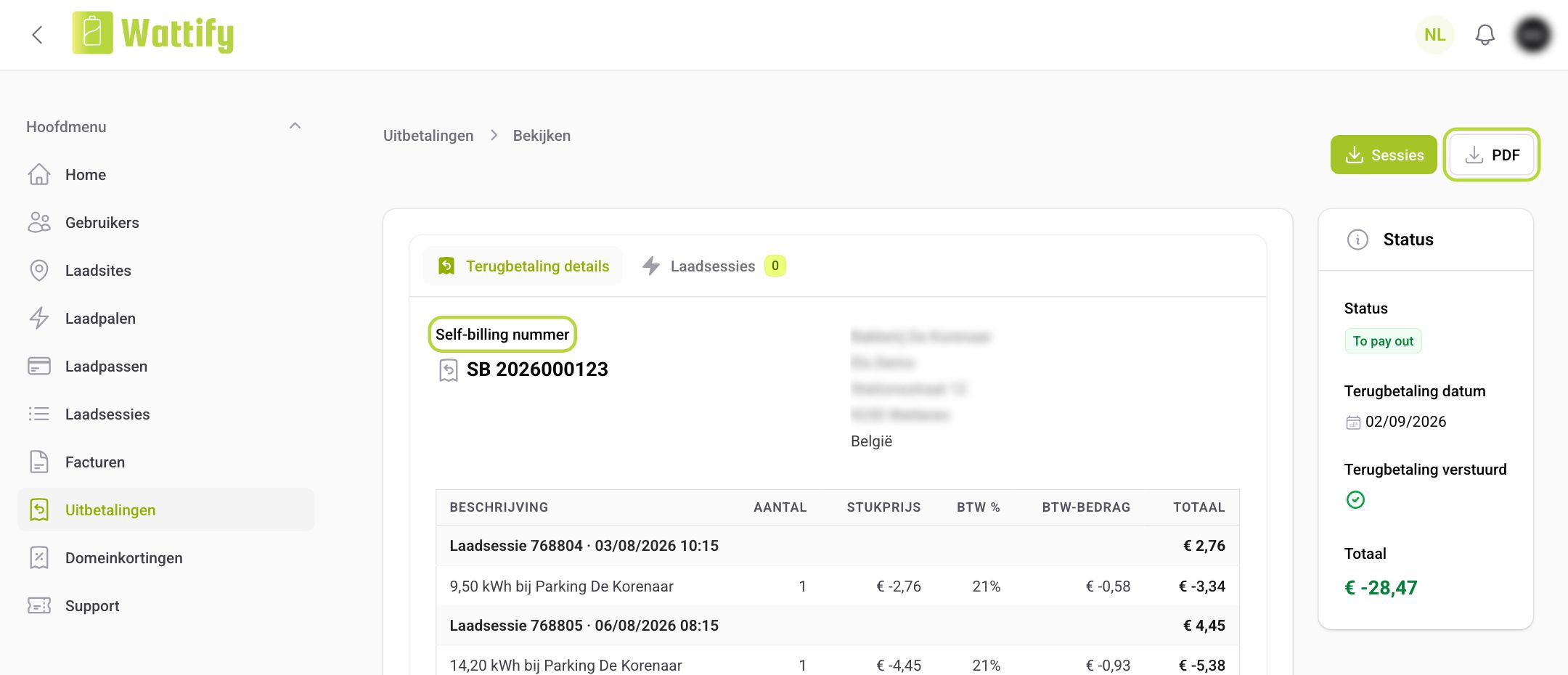
Click the row to open it. At the top you see the Self-billing number, below it the charging sessions. With the PDF button you download the invoice.
Do you have the Wattify app? Then you get a notification as soon as a new self-billing invoice is ready.
Frequently asked questions
Do I still need to send Wattify an invoice myself?
No. The self-billing invoice is your invoice to Wattify. A second invoice would book the same income twice.
How do I book the invoice?
As a sales invoice, even though it comes from Wattify. If in doubt, ask your accountant.
Something is wrong on the invoice.
Let us know within 14 days via Support. We will look into it and send a self-billing credit note if needed.
I receive the invoice by e-mail and not via Peppol.
Then your Peppol address cannot receive self-billing invoices yet, or your company is not on Peppol. Have the self-billing document types activated (see above). The invoice in the e-mail is just as valid.
Where is this in the law?
Self-billing is set out in article 53, §2 of the VAT Code. In its frequently asked questions on e-invoicing, the FPS Finance confirms that self-billing remains permitted via Peppol, with a prior agreement and acceptance of every invoice.
For your accountant
The technical description of the document type is in the Peppol BIS Self-Billing 3.0 specification.
Wattify is not a tax adviser. Status: October 2026. Ask your accountant how to book and declare these invoices.
Did this answer your question
Thank you for your feedback
Did not find an answer?
Our team is just an email away and ready to answer your questions