How to use your smartphone to scan and identify RFID badges
What you will need:
An android based phone
a RFID tag, which can be a card, fob or any other MiFare compatible card
access to Google play store
Install the NFC Tools app from https://play.google.com/store/apps/details?id=com.wakdev.wdnfc&hl=nl&gl=US
Open the app and hold a RFID card to the back of your android phone.
a screen will appear with details of the card:
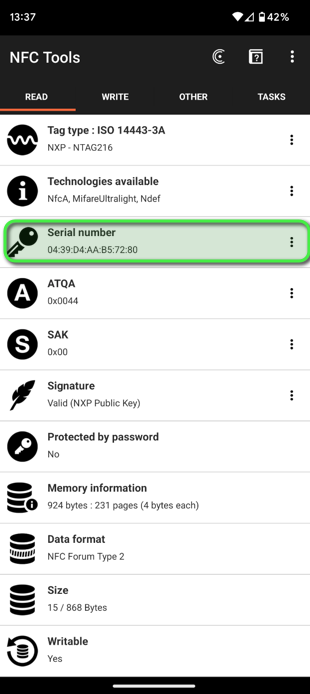
You will need the "Serial Number", note that this is in a hexadecimal format. You do not need to enter the ":" when using the serial number when entering it in the wattify platform. They will however automatically be removed when you would copy and paste them.
PS: This will currently NOT work on iOS, even if the NFC Tools app exists for iPhone and iPad.
Related articles
Did this answer your question
Thank you for your feedback
Did not find an answer?
Our team is just an email away and ready to answer your questions